
Process
Applicable to images, returns an image resource processed with the given specification.
Syntax
RESOURCE.Process SPEC
Returns
images.ImageResource
Use this method with global resources, page resources, or remote resources.
Process an image with the given specification. The specification can contain an optional action, one of crop, fill, fit, or resize. This means that you can use this method instead of Crop, Fill, Fit, or Resize.
{{ with resources.Get "images/original.jpg" }}
  {{ with .Process "crop 200x200" }}
    <img src="{{ .RelPermalink }}" width="{{ .Width }}" height="{{ .Height }}" alt="">
  {{ end }}
{{ end }}
You can also use this method to apply simple transformations such as rotation and conversion:
{{/* Rotate 90 degrees counter-clockwise. */}}
{{ $image := $image.Process "r90" }}

{{/* Convert to WebP. */}}
{{ $image := $image.Process "webp" }}
The Process method is also available as a filter, which is more effective if you need to apply multiple filters to an image. See images.Process.
Process specification
The process specification is a space-delimited, case-insensitive list of one or more of the following in any sequence:
- action
- Applicable to the
Processmethod only. Specify zero or one ofcrop,fill,fit, orresize. If you specify an action you must also provide dimensions. - dimensions
- Provide width or height when using the
Resizemethod, else provide both width and height. See details. - anchor
- Use with the
CropandFillmethods. Specify zero or one ofTopLeft,Top,TopRight,Left,Center,Right,BottomLeft,Bottom,BottomRight, orSmart. Default isSmart. See details. - target format
- Specify zero or one of
gif,jpeg,png,tiff, orwebp. See details. - background color
- When converting a PNG or WebP with transparency to a format that does not support transparency, optionally specify a background color using a 3-digit or a 6-digit hexadecimal color code. Default is
#ffffff(white). See details. - compression
- New in v0.153.5
- The compression method to use when encoding the image. One of
losslessorlossy. Thelosslessmethod is only applicable to WebP images. Default islossy. See details. - hint
- Applicable to WebP images and equivalent to the
-presetflag for thecwebpencoder. Specify zero or one ofdrawing,icon,photo,picture, ortext. Default isphoto. See details. - quality
- Applicable to JPEG and WebP images when using
lossycompression. SpecifyqNwhereNis a whole number between1and100, inclusive. Default is75. See details. - resampling filter
- Typically specify zero or one of
Box,Lanczos,CatmullRom,MitchellNetravali,Linear, orNearestNeighbor. Other resampling filters are available. See details. - rotation
- Typically specify zero or one of
r90,r180, orr270. Also supports arbitrary rotation angles. See details.
Example
{{ with resources.Get "images/original.jpg" }}
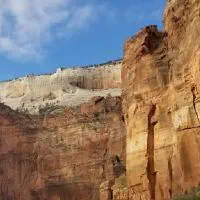
  {{ with .Process "crop 200x200 topright webp q85 lanczos" }}
    <img src="{{ .RelPermalink }}" width="{{ .Width }}" height="{{ .Height }}" alt="">
  {{ end }}
{{ end }}
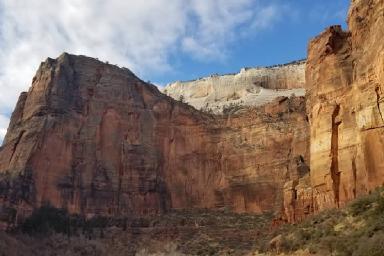
Original
Processed
Last updated:
March 5, 2025
:
content: Remove "related" array from function and method pages (2fcd21ee5)
Improve this page