
images.Process
Returns an image filter that processes the given image using the given specification.
Syntax
images.Process SPEC
Returns
images.filter
This filter has the same options as the Process method on a Resource object, but using it as a filter may be more effective if you need to apply multiple filters to an image.
The process specification is a space-delimited, case-insensitive list of one or more of the following in any sequence:
- action
- Specify zero or one of
crop,fill,fit, orresize. If you specify an action you must also provide dimensions. See details.{{ $filter := images.Process "resize 300x" }} - dimensions
- Required if you specify an action. Provide width or height when using
resize, else provide both width and height. See details.{{ $filter := images.Process "crop 200x200" }} - anchor
- Use with the
croporfillaction. Specify zero or one ofTopLeft,Top,TopRight,Left,Center,Right,BottomLeft,Bottom,BottomRight, orSmart. Default isSmart. See details.{{ $filter := images.Process "crop 200x200 center" }} - target format
- Specify zero or one of
gif,jpeg,png,tiff, orwebp. See details.{{ $filter := images.Process "webp" }} {{ $filter := images.Process "crop 200x200 center webp" }} - background color
- When converting a PNG or WebP with transparency to a format that does not support transparency, optionally specify a background color using a 3-digit or a 6-digit hexadecimal color code. Default is
#ffffff(white). See details.{{ $filter := images.Process "jpeg #000" }} {{ $filter := images.Process "crop 200x200 center jpeg #000" }} - compression
- New in v0.153.5
- The compression method to use when encoding the image. One of
losslessorlossy. Thelosslessmethod is only applicable to WebP images. Default islossy.{{ $filter := images.Process "webp lossless" }} {{ $filter := images.Process "crop 200x200 center webp lossy" }} - hint
- Applicable to WebP images and equivalent to the
-presetflag for thecwebpencoder. Specify zero or one ofdrawing,icon,photo,picture, ortext. Default isphoto. See details.{{ $filter := images.Process "webp" "icon" }} {{ $filter := images.Process "crop 200x200 center webp lossy icon" }} - quality
- Applicable to JPEG and WebP images when using
lossycompression. Optionally specifyqNwhereNis a whole number between1and100, inclusive. Default is75. See details.{{ $filter := images.Process "q50" }} {{ $filter := images.Process "crop 200x200 center webp lossy icon q50" }} - resampling filter
- Typically specify zero or one of
Box,Lanczos,CatmullRom,MitchellNetravali,Linear, orNearestNeighbor. Other resampling filters are available. See details.{{ $filter := images.Process "resize 300x lanczos" }} {{ $filter := images.Process "crop 200x200 center webp lossy icon q50 lanczos" }} - rotation
- Typically specify zero or one of
r90,r180, orr270. Also supports arbitrary rotation angles. See details.{{ $filter := images.Process "r90" }} {{ $filter := images.Process "crop 200x200 center webp lossy icon q50 lanczos r90" }}
Usage
Create a filter:
{{ $filter := images.Process "resize 256x q40 webp" }}Apply the filter using the images.Filter function:
{{ with resources.Get "images/original.jpg" }}
  {{ with . | images.Filter $filter }}
    <img src="{{ .RelPermalink }}" width="{{ .Width }}" height="{{ .Height }}" alt="">
  {{ end }}
{{ end }}
You can also apply the filter using the Filter method on a Resource object:
{{ with resources.Get "images/original.jpg" }}
  {{ with .Filter $filter }}
    <img src="{{ .RelPermalink }}" width="{{ .Width }}" height="{{ .Height }}" alt="">
  {{ end }}
{{ end }}
Example
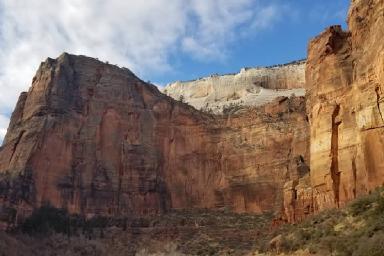
Original
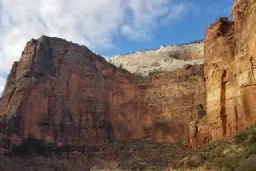
Processed
Last updated:
December 29, 2025
:
content: Document image compresssion option (013fee46f)
Improve this page